Running App for Apple Watch
Custom Running screens on Apple Watch, live with GPS, heart rate, and your real zones.
Build the running screen you actually want, a giant pace numeral, a Triad of distance, time, and heart rate, or a dense dashboard, and run it live with GPS, cadence, and your real heart-rate zones.
The whole run is recorded on the watch itself. Leave the iPhone at home and pace, cadence, zones, and the GPS route still land in Apple Health, complete with splits for every segment. No account, no cloud, nothing between you and the start button.
When training changes, the screen changes with it: an interval day counts its steps down on a slim header, a race day chases a ghost around the course, an easy day is one colossal pace numeral and nothing else.
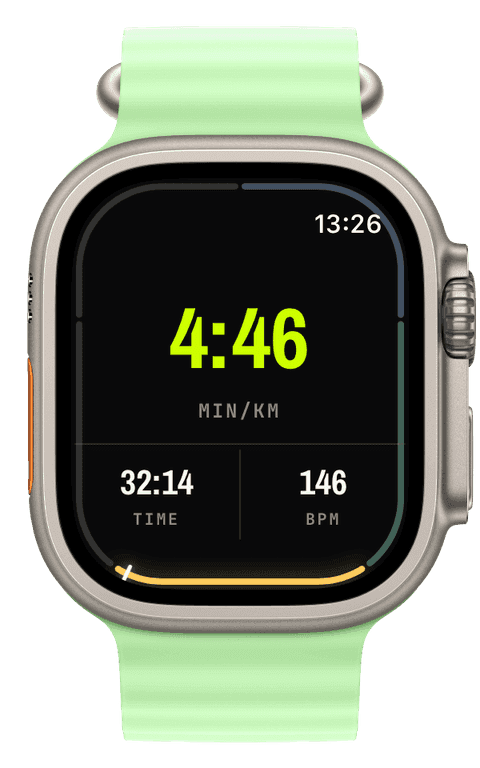
How Runara tracks running
During a run the watch records GPS at the accuracy you choose, Best, Balanced, or Battery saver, and samples heart rate continuously. Your five heart-rate zones are anchored on real data: Tanaka (208 − 0.7 × age) by default, or Karvonen using your heart-rate reserve once you set a resting heart rate.
Cadence comes live from the watch’s motion sensors in steps per minute, a metric Runara records only for foot sports, so you never see phantom numbers. Pace, speed, and cadence can be smoothed over a rolling 5, 10, 15, or 30 second window, or shown raw; press and hold the widget to change it mid-run.
Afterwards the run is written to Apple Health as one complete workout: the route, heart-rate, distance, and energy samples, and every split as a proper segment. Apple Fitness and any app you allow read exactly what the watch saw. Runara itself keeps no copy, there is no server.
A screen for every kind of run
Screens are built on the iPhone from seven layouts, from a single colossal Hero numeral to the six-slot Dense grid, with thirty-four widgets to fill them. One slot per screen carries the volt accent, so the number that matters stays readable at pace.
The details go deep: one slot can read min/km while another reads km/h, a live map or a heart-rate zone band can sit behind the numbers, and screens scope themselves, interval screens appear only while a plan is running, route screens only when you picked a route.
Structure, racing, and the long game
Interval plans, built as repeatable work-and-recovery blocks with time, distance, or open goals, count down on a slim header on the watch, with spoken cues generated on the device itself, “Work, 400 metres”, in English or German.
For racing yourself there is the ghost pacer: pick a route and a target pace between 3:00 and 10:00 min/km, in 15-second steps, and a ghost runs it with you, a dashed ring on the map and a chase bar showing how far ahead or behind you are. Off-route alerts and waypoint announcements come from the same navigation engine.
Every run also feeds the long game: TRIMP turns it into training load, 42- and 7-day curves become Fitness, Fatigue, and Form on the iPhone chart, watch complications, and Home Screen widgets. And twenty-seven running achievements, from an unbroken 1–15 km ladder to the marathon cup and 1,000 cumulative kilometres, wait in the trophy room.
- Pace & speed
- Current and per-segment pace or speed, smoothed over a window you choose, off, 5, 10, 15, or 30 seconds. Each slot can show its own unit: min/km on one screen, km/h on another.
- Cadence
- Steps per minute, live from the watch’s motion sensors, plus a cadence diagram of the whole run. Recorded only where your feet set the rhythm, never as a phantom number.
- Heart rate & zones
- Five zones anchored on your real data, Tanaka (208 − 0.7 × age) by default or Karvonen with heart-rate reserve. Live as a badge, segmented bar, or ring, and as a zone-coloured diagram.
- Distance & splits
- GPS distance with a live splits page: every segment with elapsed time and average pace. Splits are saved into the Apple Health workout with real distance metadata.
- Elevation
- Live ascent, descent, and grade, a height diagram, and, with a route chosen, its full elevation profile with your position on it.
- Route progress & pacer
- Follow an imported GPX or a saved past run, see distance remaining and remaining ascent, and race the ghost pacer with a ±60-second chase bar.
Our pick of watch screens for this sport — designed in the Runara screen designer, ready to run on your wrist.
Type the code into the Runara app to import the set, or customize a copy in the designer and share your own.
Auto Pause
Runs, rides, walks and hikes pause themselves when you stop and resume the moment you move again, tuned per sport, on by default.
→Readiness & HRV
Readiness weighs your HRV and resting heart rate from Apple Health against your own baseline, and Apple Watch Series 12 and Ultra 4 feed it far more HRV than any watch before.
→Live Workout Display
Your configured screens render on Apple Watch with real-time metrics, GPS, and haptics, legible at a glance under load.
→Interval Training Plans
Build interval workouts on iPhone with pace targets per step, then follow them with a slim on-watch header.
→GPX Routes & Navigation
Import GPX routes on iPhone and follow them on the watch, with off-route alerts, waypoints, and a live elevation profile.
→Virtual Pacer
Pick a route and a target pace, and a ghost runs it with you — the pacer widget shows exactly how far ahead or behind you are.
→3D Flyover
A chase camera flies your recorded route over 3D terrain and exports a share-ready video, right on the iPhone.
→Heart-Rate Zones
Zones anchored on your actual resting and peak HR, with a colour-blind-safe band you can read at speed.
→Spoken Audio Cues
Optional bilingual voice cues for splits, time, zones and intervals, all generated on-device.
→Live Weather
Seven environment widgets put live weather and altitude into any workout-screen slot, fetched by the watch itself.
→Workout History & Splits
Browse every saved workout with route maps, per-segment splits, and full metric detail.
→Achievements
A trophy room of eighty achievements across sixteen workout types, with engraved cups and a celebrating parrot.
→Can I run with just the Apple Watch, without the iPhone?
Yes. The watch records the entire run on its own: GPS, heart rate, cadence, zones, splits. With offline maps synced, the map keeps drawing without any connection. The iPhone is where you build screens and review history, it can stay at home.
Does Runara show running cadence on the Apple Watch?
Yes, live steps per minute as a widget and as a diagram over the whole run. You can smooth it over 5 to 30 seconds or watch it raw, and step samples are written to Apple Health with the workout.
Do I need an account or a subscription to track runs?
No. Runara has no account, no cloud, and no subscription. Your runs belong to Apple Health on your own devices, and every feature on this page is included: three workouts free to try, then one purchase unlocks it all forever.
Where do my runs end up?
In Apple Health, as complete workouts: the route, heart-rate, distance, and energy samples, and every split as a segment. Any app you grant access, Apple Fitness included, sees the same run. Runara has no server, so nowhere else.
Can Runara guide me along a running route?
Yes. Import a GPX on the iPhone, or turn any finished run into a route, and the watch draws the track under your live breadcrumb, warns you when you drift off it, announces waypoints, and shows distance remaining and the elevation profile ahead.
Does Runara pause my run at traffic lights?
Yes. Auto pause is on by default for runs and trail runs: stand still for about three seconds and the workout pauses with a haptic, start moving and it resumes within a second. It uses GPS speed, so a lost signal never pauses you, and you can switch it off per sport in the iPhone settings.
Track Running your way
Runara turns your Apple Watch into a custom Running computer. Native and private, free for your first three workouts, then one purchase unlocks everything, no account, no subscription.