
Heart-Rate Zones
Zones from your real heart, colour-blind safe.
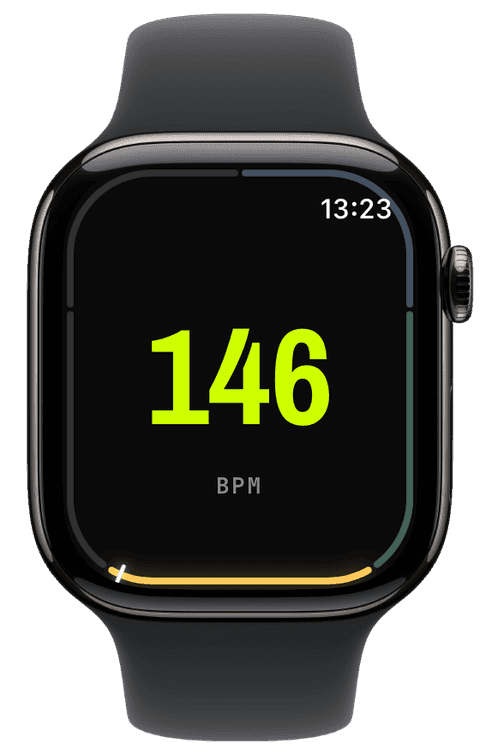
Runara computes your training zones from your actual heart-rate data read from Apple Health, your pick of the Tanaka or Karvonen formula, rather than a generic age guess.
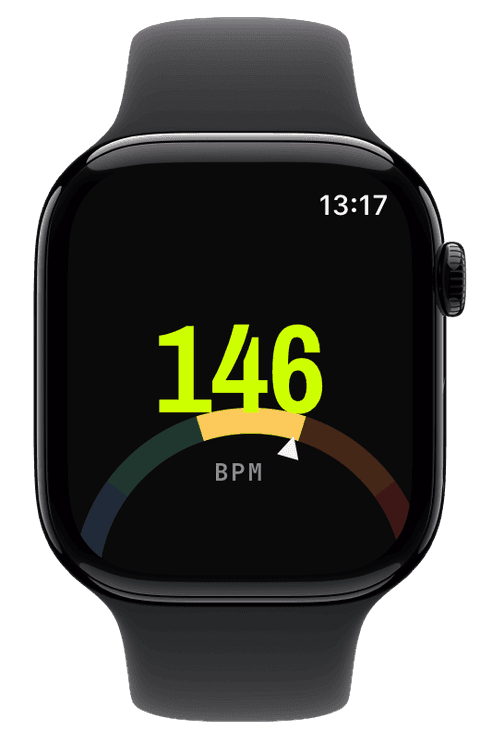
By default the HR-zone band uses an intuitive cool-to-hot ramp; you can switch on an optional colour-blind-safe palette whose monotonic luminance ramp stays readable for deuteranopia, protanopia, and monochromacy alike. Either way, a single glance tells you which zone you’re in, even at full effort.
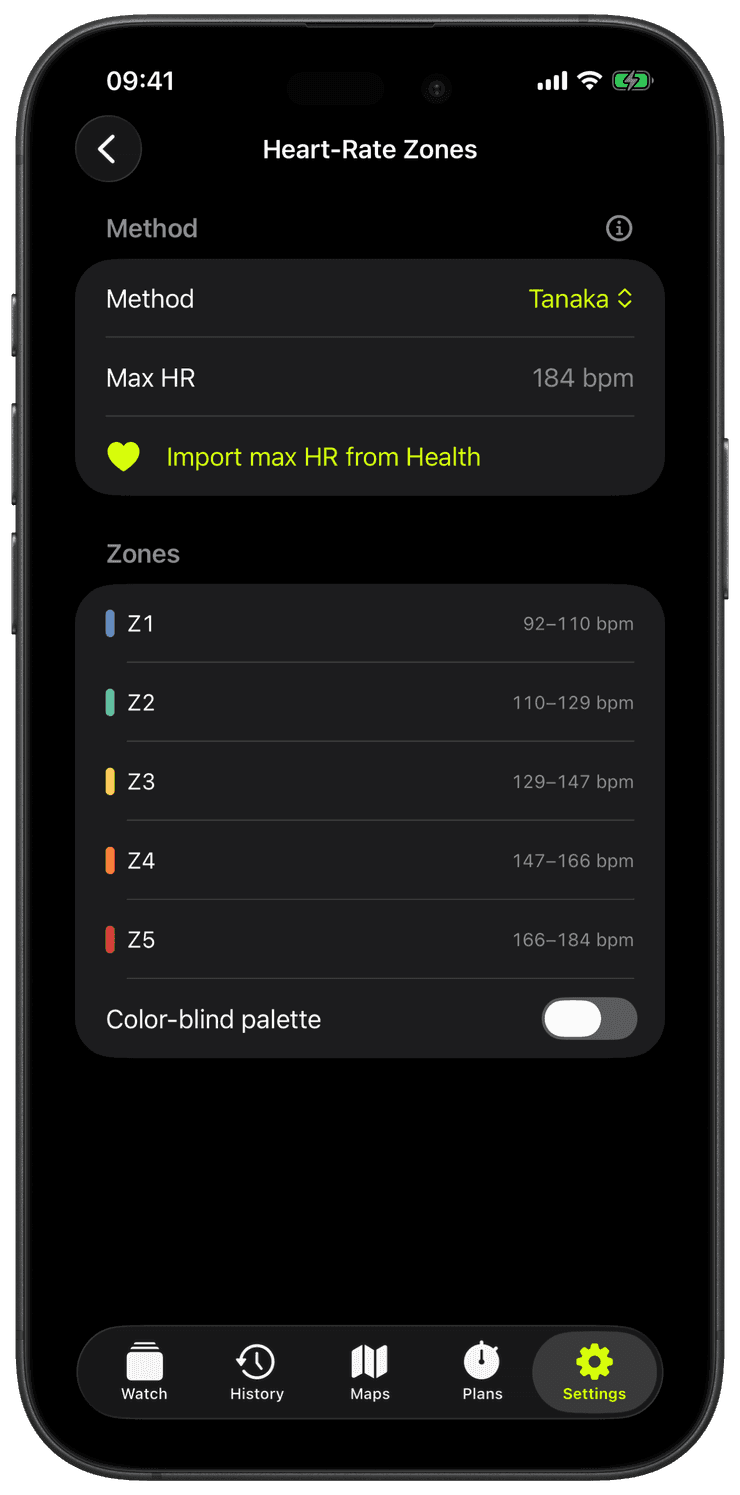
Runara starts from your maximum heart rate: Tanaka’s 208 − 0.7 × age by default, a formula with roughly half the error of the old 220 − age rule, or a measured max you pin yourself, or the highest value found in a scan of your last ninety days in Apple Health.
Five zones span 50 to 100 percent of that maximum by default, and every boundary is yours to override with custom fractions.
Prefer heart-rate reserve? Switch to Karvonen and zones compute from resting heart rate upward, resting HR imported from Apple Health or typed in, with a visible fallback to Tanaka if it is missing.
Live, the zone shows wherever you want it: a badge, a segmented bar, a 270° ring, a zone-coloured heart-rate diagram, a full zone band behind the whole screen, or a zone rail, a closed ring tracing the display’s rounded edge, all five zones climbing clockwise with a dash marking your live heart rate. The rail even layers over a dimmed live map, and spoken crossings announce zone changes if you enable them.
Two ways to anchor your zones
Pick the model that matches the data you trust. Both start from your real resting and peak heart rate in Apple Health, not a generic 220-minus-age guess.
Tanaka
% of maximum heart rateHRmax = 208 - 0.7 × age
Estimates your maximum heart rate from age with the Tanaka equation, a closer population fit than the old 220 - age, then divides the zones as percentages of that maximum. Simple and dependable when you just want zones off your peak.
Karvonen
% of heart-rate reservetarget = rest + % × (max - rest)
Works from your heart-rate reserve, the span between resting and maximum heart rate, so every zone reflects effort relative to your own range. More individual, and more accurate the better your resting heart rate is known.
Which should you pick?
Tanaka keys the zones to your maximum alone; Karvonen folds in your resting heart rate, so for the same percentage it sets a higher, more personal target. Choose Karvonen when your resting heart rate is well measured, which Runara reads straight from Apple Health; choose Tanaka for a straightforward max-based split.
Readable for every kind of vision
By default the zone band uses the intuitive cool-to-hot colours most athletes already know. An optional colour-blind-safe palette is one toggle away; it is off unless you turn it on.
Default ramp
Cool blue, through teal, amber and orange, up to hot red. The meaning lives in the hue, the convention you can read at a glance. The trade-off: where red, orange and amber meet they can blur under red-green colour vision, and the brightness jumps around rather than rising with intensity.
Colour-blind-safe ramp
OptionalA viridis-derived ramp that climbs from dark purple to bright yellow. Its brightness increases steadily from Z1 to Z5, so the zones stay in the right order by luminance alone, even when hue can't be told apart. It is chosen specifically to stay distinct under deuteranopia, protanopia and monochromacy.
Both ramps map the same five zones (Z1 easy to Z5 max). The colour-blind option swaps the familiar hot/cold hues for a steady brightness ramp you can read no matter how you perceive colour.
Tanaka or Karvonen, which should I pick?
Tanaka needs only your age and is the sensible default. Karvonen anchors zones on your heart-rate reserve, the span between resting and maximum, so two athletes of the same age with different resting heart rates get genuinely different zones. If your resting HR is well below average, Karvonen is worth the switch.
Why not the classic 220 − age?
Because it is the least accurate common formula, roughly 10–15 beats of standard error against Tanaka’s ~7. If even that is too coarse, pin a measured maximum or let the ninety-day Apple Health scan find your real peak.
Can I set fully custom zones?
Yes, both anchors and boundaries: pin your own max HR, and override the default 50/60/70/80/90 percent boundaries with custom fractions, lab-tested zones transfer straight in.
I am colour-blind, can I read the zone band?
Yes, switch on the colour-blind-safe palette: its luminance rises monotonically from zone one to five, so the bands stay ordered and distinguishable under deuteranopia, protanopia, and even full monochromacy.
The run I lost to a beta OS
A 6 km run in the July heat where my own app would not record and would not stop, the 1.5 km it cost me, and the watchOS 27 beta bug I had to fix in a build compiled against the old SDK.
→Live metrics, and maps that work where the signal doesn't
Getting real numbers on the wrist, then teaching the watch to draw a map with no cloud and no signal. Plus the bugs that fought back.
→Why I built my own running app
I started running again at 41, hated paying a subscription to see my own data, and decided to build the app I actually wanted. Here is where it started.
→