Walking App for Apple Watch
Custom Walking screens on Apple Watch, live with GPS, heart rate, and your real zones.
A calmer screen for everyday movement: steps, pace, distance, and an optional route map, written cleanly into Apple Health.
A walk in Runara is a deliberate workout, you press start, the watch counts you in, and everything from heart rate to the GPS route is recorded properly, not a step counter guessing in the background. No account, no cloud, and the data lands where your other training already lives.
How Runara tracks a walk
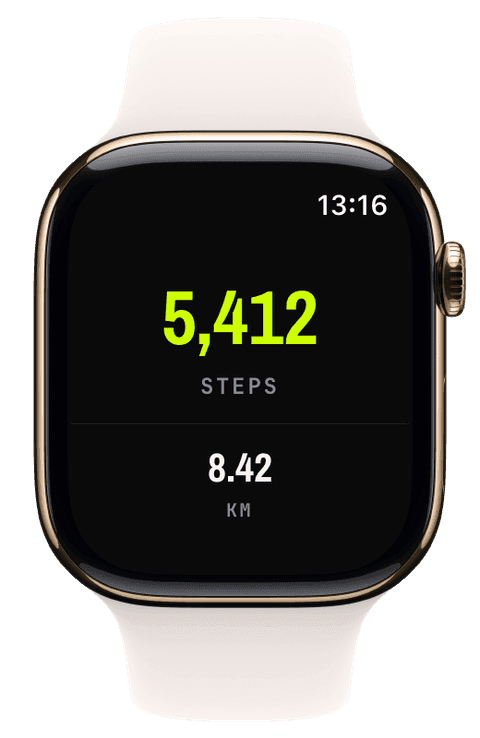
Walks record with the full outdoor stack: GPS at your chosen accuracy tier, continuous heart rate, steps and cadence from the motion sensors, and live elevation for hilly neighbourhoods. The screen can be as quiet as the walk, a big step count over distance, or a single unhurried pace numeral.
The finished walk is saved to Apple Health as a Walking workout with the complete route and step samples, so your rings, trends, and any other app you allow see it properly. It counts toward achievements too, walking has its own entries, and long easy walks nudge your training load the gentle way.
Why not just a step counter?
Step counters estimate all day; a recorded walk measures. Starting a workout gives you a real GPS route on the map, heart rate against your zones for the whole hour, per-segment splits if you want them, and a clean entry in your history next to your runs and rides, data you own in Apple Health rather than a dashboard in someone’s cloud.
- Steps
- Live step count for the walk itself, measured by the watch and written to Apple Health as part of the workout.
- Pace & distance
- GPS pace and distance, smoothable over 5 to 30 seconds so a stroll does not read like a stock ticker.
- Heart rate
- Continuous heart rate with your five zones available if you want them, useful when walking is your recovery or your training.
- GPS route
- The full route on a live map background or map widget, saved into Apple Health with the workout.
- Active energy
- Energy for the session, on screen if you want it, in Apple Health either way.
Our pick of watch screens for this sport — designed in the Runara screen designer, ready to run on your wrist.
Type the code into the Runara app to import the set, or customize a copy in the designer and share your own.
Auto Pause
Runs, rides, walks and hikes pause themselves when you stop and resume the moment you move again, tuned per sport, on by default.
→Live Workout Display
Your configured screens render on Apple Watch with real-time metrics, GPS, and haptics, legible at a glance under load.
→Live Weather
Seven environment widgets put live weather and altitude into any workout-screen slot, fetched by the watch itself.
→Workout History & Splits
Browse every saved workout with route maps, per-segment splits, and full metric detail.
→Apple Health Sync
Reads your heart rate and routes, writes complete workouts back with per-segment splits and energy.
→Achievements
A trophy room of eighty achievements across sixteen workout types, with engraved cups and a celebrating parrot.
→Does Runara map my walking route?
Yes. Outdoor walks record the full GPS route; you can watch it draw live on a map background during the walk and see it on the iPhone afterwards, auto-fitted in the workout detail. The route is saved into Apple Health with the workout.
Do walks count as real workouts?
Yes. A walk saves to Apple Health as a Walking workout with route, heart rate, steps, and energy, closes rings, appears in your history next to runs, earns walking achievements, and feeds your training load based on the actual effort.
Do I need an account or a subscription for walk tracking?
No. Runara has no account, no cloud, and no subscription, walks are recorded on the watch and stored in Apple Health on your devices, nowhere else.
Can the screen be simpler than a running dashboard?
Yes, that is the point of the configurator. A walking screen can be a single huge step count, or steps over distance, and nothing else. You design it once on the iPhone and the watch keeps it just for walks.
Will the workout pause when I stop to look at something?
Yes, auto pause is on by default for walks and hikes. It is tuned for walking speeds, so a slow stroll keeps recording while a real stop of about four seconds pauses the clock, and it resumes once you walk on. Switch it off per sport in the iPhone settings if you prefer to count every minute.
Track Walking your way
Runara turns your Apple Watch into a custom Walking computer. Native and private, free for your first three workouts, then one purchase unlocks everything, no account, no subscription.