
Virtual Pacer
A ghost to chase, on your own route.
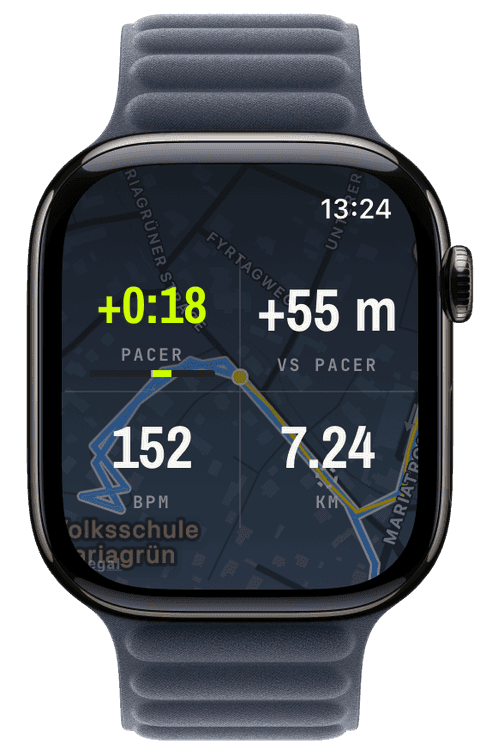
After you pick a route on the watch, choose a target pace, from 3:00 to 10:00 min/km in fifteen-second steps (mile units if that’s how you run), and a ghost sets off along the route at exactly that pace. The watch remembers your last target per route, so restarting yesterday’s chase is two taps.
The ghost appears as a dashed ring on every map surface, and the pacer widget reads out the gap the way you prefer: time banked or lost, distance ahead or behind, or a chase bar that makes the duel legible at a glance. The ghost plays fair, it waits while you pause and stops at the finish line.
Like everything in Runara, the race happens entirely on your wrist: no cloud opponent, no account, no leaderboard, just you against the pace you promised yourself.
Pick a route at workout start, any imported GPX or a saved past workout, the pacer needs a course to run.
Choose the target pace, 3:00 to 10:00 min/km in fifteen-second steps, or take the pace the watch remembered from your last attempt on this route.
Run. The ghost moves along the route at exactly that pace, a dashed ring on the map, while the pacer widget shows the gap as ± time, ± distance, or the chase bar.
Pause and the ghost waits; finish and it stops at the line. The verdict is the gap you see, no leaderboard, no upload, no opponent but your own promise.
Can I race my previous run directly?
The ghost runs a constant pace, racing the uneven splits of a past workout is deliberately not built yet. What you can do today: save that run as a route and set the ghost to its average pace, a steadier opponent on the identical course.
Does the pacer work without a route?
No, the ghost needs a course to run along, that is what makes the duel spatial: you see it ahead on the actual map, not just a number drifting. Any saved workout can become that course in one tap.
What exactly does the chase bar show?
Your gap to the ghost on a ±60-second scale: centred means on pace, right of centre you lead, left you chase, and beyond a minute the marker pegs at the end. It is the glanceable version of the ± time readout.
Can the map rotate to my direction of travel?
Yes, the Map orientation setting turns workout maps course-up: travel direction points up, the position dot becomes a heading arrow, and the rotation is smoothed and only active while you move. A compass button on the expanded map flips the mode per session.