Cycling App for Apple Watch
Custom Cycling screens on Apple Watch, live with GPS, heart rate, and your real zones.
A big speed readout, a split effort view, or a full ride dashboard, Runara records your road ride with GPS, heart rate, and zones, then writes the whole route back to Apple Health.
Think of it as a bike computer on your wrist: a screen you composed yourself, glanceable at speed, with a route line to follow and no phone required on the bars, or in your pocket at all.
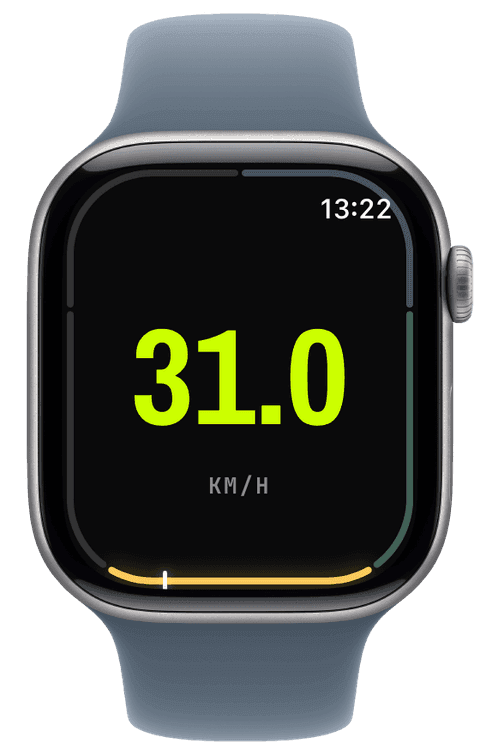
A bike computer you composed yourself
Cycling screens are built for glances at speed: a colossal km/h numeral on the Hero layout, a speed gauge whose ceiling you set to match your riding, or a Quad of speed, distance, heart rate, and time. One volt-accented slot keeps the number that matters findable in a half-second look.
Climbs deserve their own chapter: tap New Segment at the bottom of the hill and the splits page records it as its own entry, with distance and average speed, while live ascent and grade tell you what the road is doing right now.
How Runara tracks a ride, honestly
The ride is recorded from the watch’s own sensors: GPS at the accuracy tier you choose, continuous heart rate against your five zones, live elevation. Runara does not pair with external speed, cadence, or power sensors, if your training is built around watts, a head unit remains the right tool; if it is built around effort, route, and time, the watch on your wrist already carries everything needed.
The finished ride saves to Apple Health as a Cycling workout with the full route, and any app you allow reads it from there. Eleven riding achievements, from a first 10 km to a 200 km single ride and 5,000 cumulative kilometres, give the long game a scoreboard.
Routes for unfamiliar roads
Import a GPX loop or turn a past ride into a route, and it draws under your position on the map, online or from offline tiles synced before you left. Drift off the line and the watch buzzes; the route progress widget carries distance remaining and the climb still ahead, and the elevation profile shows the shape of the next kilometres, useful intelligence before a col.
- Speed
- Current and per-segment speed, smoothed over a window you choose, as a numeral or a gauge with a ceiling you set yourself.
- Heart rate & zones
- Five zones anchored on your real data, the steadier signal when wind and gradient make speed lie.
- Elevation & grade
- Live ascent, descent, and grade, plus the route’s elevation profile when you ride with one chosen.
- Distance & segments
- GPS distance with hand-marked segments, a climb, a lap, an interval, each with its own split entry.
- GPS route
- The full ride on a live map, drawn from online tiles or your synced offline region, and saved into Apple Health.
- Active energy
- Energy for the ride, written to Apple Health and feeding your training load alongside heart-rate effort.
Our pick of watch screens for this sport — designed in the Runara screen designer, ready to run on your wrist.
Type the code into the Runara app to import the set, or customize a copy in the designer and share your own.
Auto Pause
Runs, rides, walks and hikes pause themselves when you stop and resume the moment you move again, tuned per sport, on by default.
→Readiness & HRV
Readiness weighs your HRV and resting heart rate from Apple Health against your own baseline, and Apple Watch Series 12 and Ultra 4 feed it far more HRV than any watch before.
→Live Workout Display
Your configured screens render on Apple Watch with real-time metrics, GPS, and haptics, legible at a glance under load.
→GPX Routes & Navigation
Import GPX routes on iPhone and follow them on the watch, with off-route alerts, waypoints, and a live elevation profile.
→3D Flyover
A chase camera flies your recorded route over 3D terrain and exports a share-ready video, right on the iPhone.
→Heart-Rate Zones
Zones anchored on your actual resting and peak HR, with a colour-blind-safe band you can read at speed.
→Workout History & Splits
Browse every saved workout with route maps, per-segment splits, and full metric detail.
→Offline Maps
Save a map area on iPhone and your Apple Watch shows it anywhere, with no signal and no phone.
→Live Weather
Seven environment widgets put live weather and altitude into any workout-screen slot, fetched by the watch itself.
→Achievements
A trophy room of eighty achievements across sixteen workout types, with engraved cups and a celebrating parrot.
→Can the Apple Watch replace a bike computer?
For rides built on speed, route, heart rate, and time, yes: you compose a glanceable screen, follow a route line, and get a complete workout in Apple Health, with nothing mounted on the bars. If your training revolves around power meters and paired sensors, a head unit is still the right tool, Runara deliberately records only what the watch itself measures.
Does Runara connect to cadence or power sensors?
No. Runara uses the watch’s own GPS, heart-rate, and motion sensors, and nothing else, no pairing, no external hardware. That is a deliberate trade: fewer moving parts and an honest record of what the watch saw, rather than a partial sensor ecosystem.
Can I ride without the iPhone?
Yes. The watch records GPS, heart rate, and elevation on its own, follows synced routes, and keeps the map drawing from offline tiles if you prepared the region. The phone can stay home; the ride syncs into your history when you are back.
Does the ride land in Apple Health automatically?
Yes, as a Cycling workout with the complete route, heart-rate, distance, and energy samples, the moment you save it. Apple Fitness and any app you grant access read the same ride; Runara keeps no copy anywhere else.
Does the ride pause at junctions?
Yes. Auto pause is on by default for road and mountain-bike rides, with its own cycling profile: roll below walking pace for a few seconds and the ride pauses, pedal off and it resumes almost immediately. Your moving time and average speed stay honest, and Apple Health records ordinary pause events.
Track Cycling your way
Runara turns your Apple Watch into a custom Cycling computer. Native and private, free for your first three workouts, then one purchase unlocks everything, no account, no subscription.