Mountain Biking App for Apple Watch
Custom Mountain Biking screens on Apple Watch, live with GPS, heart rate, and your real zones.
On the singletrack, the offline map and climb tracking keep working where the signal drops. Record the descent and the grind back up, all into Apple Health.
Load the trail as a GPX before you ride and the watch keeps you on it: the track under your position, a buzz when you leave the line, and the elevation profile of what is still coming, with no phone strapped to the bars and no subscription behind the maps.
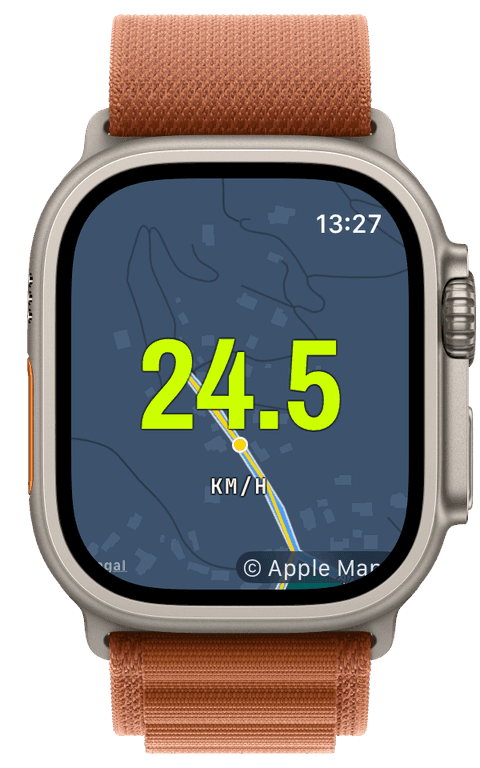
Trails without signal, maps without a subscription
Prepare the region on the iPhone, pick the zoom detail, and the tiles sync to the watch before you ever leave the car park. In the woods, the map background and map widget switch to those tiles by themselves when coverage dies, and an offline switch forces it from the start if you prefer certainty. There is no Pro tier and no per-region purchase, offline maps are simply part of the app.
GPX trails ride along with their waypoints: the track draws under your position, off-route detection buzzes when you take the wrong fork, debounced so a tight berm does not trigger it, and the route progress widget carries distance remaining and the climb still ahead of you.
The descent and the grind, both recorded
Live ascent, descent, and grade run through the whole ride, and the New Segment button turns laps of a downhill line, or the fire-road climb between them, into their own split entries with distance and average speed. Heart rate against your zones tells the truth about the climb your speed hides.
The ride saves to Apple Health with the complete track. One honest detail: Health categorises it under Cycling, that is Apple’s type system, while Runara keeps mountain biking as its own sport in history, screens, and the riding achievements.
- Offline map & trail
- Your position and the GPX track on tiles stored on the watch, pannable and zoomable with gloves off or the Crown with them on.
- Elevation & climb
- Live ascent, descent, and grade, plus the route profile of what is coming, the difference between pacing a climb and being surprised by it.
- Speed
- Current and per-segment speed, smoothed so singletrack jitter reads as a number instead of noise.
- Heart rate & zones
- Continuous heart rate with your five zones, the honest measure of a technical climb taken at walking speed.
- Segments
- Mark each descent lap or climb by hand and read them as separate splits afterwards, distance and average speed per run.
- GPS route
- The full ride recorded and saved into Apple Health, ready to become a followable route for the next visit via Save as route.
Our pick of watch screens for this sport — designed in the Runara screen designer, ready to run on your wrist.
Type the code into the Runara app to import the set, or customize a copy in the designer and share your own.
Auto Pause
Runs, rides, walks and hikes pause themselves when you stop and resume the moment you move again, tuned per sport, on by default.
→Offline Maps
Save a map area on iPhone and your Apple Watch shows it anywhere, with no signal and no phone.
→GPX Routes & Navigation
Import GPX routes on iPhone and follow them on the watch, with off-route alerts, waypoints, and a live elevation profile.
→3D Flyover
A chase camera flies your recorded route over 3D terrain and exports a share-ready video, right on the iPhone.
→Live Workout Display
Your configured screens render on Apple Watch with real-time metrics, GPS, and haptics, legible at a glance under load.
→Live Weather
Seven environment widgets put live weather and altitude into any workout-screen slot, fetched by the watch itself.
→Workout History & Splits
Browse every saved workout with route maps, per-segment splits, and full metric detail.
→Achievements
A trophy room of eighty achievements across sixteen workout types, with engraved cups and a celebrating parrot.
→Can I track MTB rides without a phone on the bars?
Yes, without the phone anywhere on the ride. The watch records GPS, heart rate, and elevation itself, follows the synced trail from offline tiles, and buzzes for wrong turns. Prepare maps and routes at home, then ride.
Can I load a trail GPX onto the watch?
Yes. Open the GPX in Runara on the iPhone, from Mail, Files, or Safari, and it syncs to the watch with up to fifty waypoints. On the trail you get the drawn track, off-route alerts, waypoint announcements, progress, and the elevation profile, all offline-capable and none of it behind a subscription.
Does Runara record descents and climb separately?
Ascent and descent accumulate separately and live, grade shows the pitch you are on, and the New Segment button lets you bracket each descent run or climb into its own split. The iPhone detail view draws the full elevation diagram of the ride afterwards.
How does a mountain-bike ride appear in Apple Health?
As a Cycling workout with the complete route and samples, Apple Health has no separate mountain-bike type, so Runara stores it the standard way and keeps the mountain-bike identity in its own history, screens, and achievements.
Track Mountain Biking your way
Runara turns your Apple Watch into a custom Mountain Biking computer. Native and private, free for your first three workouts, then one purchase unlocks everything, no account, no subscription.