Pool Swimming App for Apple Watch
Custom Pool Swimming screens on Apple Watch, live with heart rate and your real zones, no GPS needed.
For the pool, Runara tracks lengths, swim pace per 100 m, stroke count and rate, and your SWOLF score, and engages water lock automatically so a splash never breaks the screen.
Counter-current pools are supported too. A dedicated mode counts your strokes from wrist motion and records time and heart rate honestly, without inventing distance a stationary swim cannot know. And with simulated lanes, one reference swim teaches the watch your distance per stroke; after that it buzzes at each virtual lane so you turn at the wall, and your swim produces real distance, pace, and lengths.
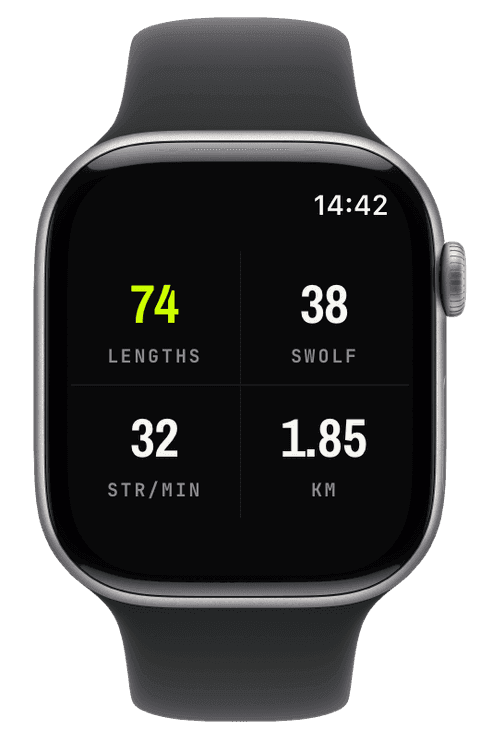
Lengths, pace per 100 m, and SWOLF
Set your pool once, presets for 25 m, 33⅓ m, 50 m, and small 8 m pools, 25 yd and 50 yd for imperial lanes, or any custom length from 5 to 100 metres dialled in half-metre steps with the Digital Crown, and every metric derives correctly: lengths counted against the lap length, pace expressed per 100 m the way swimmers actually think, distance synthesized from walls touched.
SWOLF is the technique number: your strokes per length plus the seconds it took, per length, straight from the watch’s lap detection. Lower is smoother. Watching it live, next to stroke count and stroke rate, tells you whether that faster pace came from fitness or from thrashing.
Three pool modes, all honest
Laps is the classic mode for a lane pool. Counter-current is for endless pools and swim spas: there are no walls to count and no GPS underwater, so Runara counts your strokes itself, from wrist motion at 25 samples a second, and records time, heart rate, and strokes without inventing a distance a stationary swim cannot know.
Simulated lanes goes one step further: a single reference swim teaches the watch your metres per stroke, and from then on a counter-current session produces distance, pace, and lengths, with a strong buzz and a spoken “Swim out and turn” at every virtual wall. The estimated distance is saved to Apple Health, labelled as what it is: an estimate built on your own calibration.
Water Lock, then a clean save
Water Lock engages by itself the moment a swim starts, so a splash never taps a button, and a lock control on the actions panel re-arms it mid-session after you check something. When you climb out, the swim saves to Apple Health as a proper swimming workout, distance, strokes, heart rate, energy, readable by every app you allow. Ten swimming achievements, from the first 100 m to a 5 km single swim, collect in the trophy room.
- Lengths
- Counted against your configured pool length, from 8 m hotel pools to 50 m lanes, with custom lengths in half-metre steps.
- Swim pace (per 100 m)
- Pace the way swimmers read it, time per 100 metres, live during the set and per split afterwards.
- SWOLF
- Strokes per length plus seconds per length, the classic swim-efficiency score. Lower means a smoother, longer stroke.
- Stroke count & rate
- Strokes of the worn wrist, live as count and as strokes per minute, in counter-current mode counted by Runara’s own motion detection.
- Heart rate & zones
- Continuous heart rate through the swim with your five zones, the honest effort gauge when pace is flattened by technique.
- Active energy
- Energy for the session, saved into the Apple Health workout alongside distance and strokes.
Our pick of watch screens for this sport — designed in the Runara screen designer, ready to run on your wrist.
Type the code into the Runara app to import the set, or customize a copy in the designer and share your own.
Live Workout Display
Your configured screens render on Apple Watch with real-time metrics, GPS, and haptics, legible at a glance under load.
→Workout History & Splits
Browse every saved workout with route maps, per-segment splits, and full metric detail.
→Heart-Rate Zones
Zones anchored on your actual resting and peak HR, with a colour-blind-safe band you can read at speed.
→Achievements
A trophy room of eighty achievements across sixteen workout types, with engraved cups and a celebrating parrot.
→What is SWOLF, and how does Runara measure it?
SWOLF adds your strokes per length to the seconds that length took, swim golf, lower is better. The watch detects each length and its strokes; Runara shows the score live as a widget so you can trade stroke count against speed and watch the sum. It is a technique number, comparable only in the same pool at the same length.
How do I set the pool length, and what about odd pools?
Pick a preset, 25 m, 33⅓ m, 50 m, 8 m, 25 yd, 50 yd, or dial any custom length between 5 and 100 metres in half-metre steps with the Digital Crown. Getting the length right matters: lengths, distance, pace, and SWOLF all derive from it.
Does Runara work in an endless pool or swim spa?
Yes, with a dedicated counter-current mode. Without walls or GPS the watch cannot know distance, so Runara counts strokes from wrist motion and records time and heart rate honestly. If you want distance anyway, calibrate simulated lanes once and the watch converts your strokes into distance, pace, and lengths, buzzing at every virtual wall.
What if lengths are counted wrong?
Length detection lives in the watch’s sensors: a firm push off the wall and a consistent stroke help it, drills, abrupt stops, and mixed-stroke lengths confuse it, and a wrong configured pool length skews everything downstream. Check the length setting first; for drill-heavy sessions the honest counter-current mode avoids fictional lengths entirely.
Do I have to remember Water Lock?
No. It engages automatically when the swim starts, a first-time hint explains the long Digital-Crown press that unlocks it, and a lock button on the actions panel re-arms it mid-workout if you unlocked to check something.
Track Pool Swimming your way
Runara turns your Apple Watch into a custom Pool Swimming computer. Native and private, free for your first three workouts, then one purchase unlocks everything, no account, no subscription.