
Live metrics, and maps that work where the signal doesn't
Getting real numbers on the wrist, then teaching the watch to draw a map with no cloud and no signal. Plus the bugs that fought back.
With the foundations in place, it was time for the part that actually matters on a run: real numbers, live, on the wrist. And then the part I was most excited about, a map that keeps working when the signal does not.
A workout that does not fall asleep
The core of the live experience is a HealthKit workout session. That choice is not just about saving the workout at the end. An active HKWorkoutSession is what keeps the app awake and in the foreground for the entire run, so the watch does not doze off between heartbeats. Speed, heart rate, distance, elevation, and cadence stream in, and a publisher fans them out to whatever screen you are currently looking at.
Getting that stream to behave took a few rounds. Three commits in a single evening tell the story:
fix(phase-5): switch live snapshot pulse from Timer to Task.sleep loop fix(phase-5): start snapshot pulse before awaiting HK beginCollection fix(phase-5): TimelineView-driven clock + idempotent stop + instant dismiss
The short version: sensors fire on their own irregular schedule, and my first attempt used a timer that happily ticked away while the code was still waiting on HealthKit to start collecting. The fix was to drive the clock the way the system wants and to make stopping a workout idempotent, so a double-tap on Stop cannot wedge the state machine. Small, unglamorous corrections that are the difference between "works in the demo" and "works on a real run when you are tired and impatient."
Location had its own lesson. I had flipped on background location updates globally, which is exactly the wrong thing on watchOS:
fix(phase-5): never set allowsBackgroundLocationUpdates on watchOS
The watch does not need it during a workout, the session already guarantees foreground time, and setting it is just asking for trouble. I deferred the flag to the moment a workout starts on iPhone and suppressed it entirely on the watch.
Numbers you can read at a glance
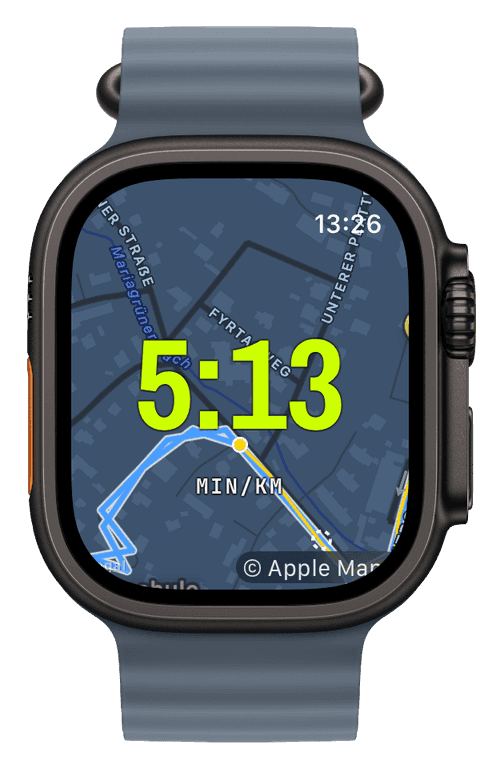
On top of the live engine came the widgets: elapsed time, distance, pace, heart rate, each in a few variants and each sized for its slot, so a single hero numeral stays huge and a dense grid still packs six readings without turning to mush. Then the diagrams, built on Swift Charts, line, area, and bar variants for speed, heart rate, and elevation, filling live from a rolling buffer as you run.
The heart-rate zones were the first piece that felt genuinely mine to get right. Zones are computed from your actual heart-rate data, your choice of the Tanaka or Karvonen formula, not a generic guess based on your age. A zone band tints the screen so you know where you are without reading a number. (Later I added a colour-blind-safe palette, but that is a story for a polish post.)
The map that fought back
Here is the feature I am proudest of, and the one that fought me hardest.
I run the trails around Lieboch, and trails are exactly where phone signal gives up. I did not want a map that goes blank the moment you leave town. So offline maps work like this: on the iPhone you pick a region, and the app rasterizes it into a stack of map tiles using Apple's map snapshotter, packs them into a standard MBTiles file, and ships that bundle over the direct watch-to-phone link. No cloud, no account. The watch then renders the tiles itself, drawing your route on top in the volt accent, even with no signal at all.
Every layer of that resisted.
The tile generation runs the snapshotter on the main actor, and the snapshot it hands back is not safe to pass between threads, so encoding each tile to PNG had to happen right there in the callback rather than being shuffled off elsewhere. Getting that isolation right under Swift 6's strict rules was fiddly.
Then the transfer. The system's file-transfer API does not tell you when a file actually arrives, so the phone never knew its bundle had landed:
fix(wc-transfer): watch acks file receive so iPhone marks delivered without OS callback
I had the watch send an explicit acknowledgement back over the sync channel. Now the phone marks a bundle delivered because the watch said so, not because it is waiting on a callback that never comes.
And then the map widget itself, twice:
fix(watch-map): keep the camera centred on the user as they move fix(map): let the expanded map handle pan / zoom, stop swallowing its gestures
The first is obvious in hindsight: a map that shows your position but does not follow you is not much of a map. The second was sneakier. Double-tapping to expand the map into a full-screen view worked, but the expanded view then ate every pan and zoom gesture because the map state was trapped inside the swipeable screen stack. I had to lift that state out so the overlay could actually respond to your fingers.
The one that taught me the most was about what "offline" even means:
fix(maps-watch): trust WCSession.isReachable so the iPhone bridge counts as online
On a real Apple Watch, the connection to the paired iPhone reports itself as "requires connection," not "satisfied," which my naive network check read as offline. So the watch kept falling back to offline tiles even with the phone right there. The fix was to trust the watch-to-phone reachability first and treat the general network monitor as a fallback. Obvious once you see it on real hardware. Invisible in the simulator.
What I learned
Almost every bug in this stretch only showed up on a real device, on a real run, in real conditions. Claude was excellent at the shape of the code and terrible at predicting how an actual Apple Watch behaves on a wet trail with a flaky connection. That division of labour, machine for the structure, me for the reality check, is a pattern that held for the whole project.
Next: what happens when you tap stop, and the bug I caught one save before it would have wiped real data.
Live Workout Display
Your configured screens render on Apple Watch with real-time metrics, GPS, and haptics, legible at a glance under load.
→Offline Maps
Save a map area on iPhone and your Apple Watch shows it anywhere, with no signal and no phone.
→Heart-Rate Zones
Zones anchored on your actual resting and peak HR, with a colour-blind-safe band you can read at speed.
→