Open Water Swimming App for Apple Watch
Custom Open Water Swimming screens on Apple Watch, live with GPS, heart rate, and your real zones.
In open water, GPS maps your route while stroke count and stroke rate track your technique. Water lock keeps the screen honest and the whole swim writes back to Apple Health.
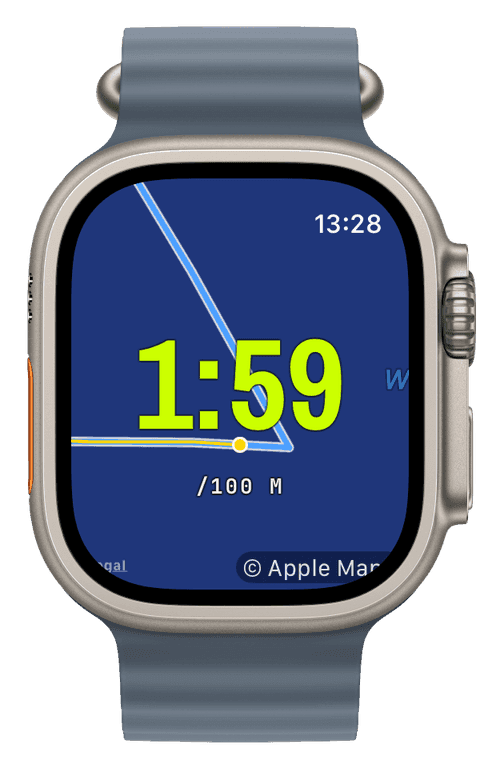
The map widget shows the swim as it happens, your track across the lake instead of a number you have to trust blindly, and afterwards the iPhone draws the full route in the workout detail. Pace stays in swimmer’s units, time per 100 m, all the way through.
What open water changes
A lake has no walls, so there are no lengths and no SWOLF out here, those are pool numbers, and Runara does not pretend otherwise. What replaces them is better suited to open water: a GPS track of where you actually swam, distance from that track, pace per 100 m derived from it, and stroke count and rate for technique.
The screen can carry a live map with your swim trail, the same map engine the trail sports use, so sighting mistakes show up as wobbles you can see, not just a slower split. Water Lock arms itself at the start, exactly as in the pool.
Recorded like a swim, saved like a workout
Heart rate runs continuously against your zones, energy accumulates, and the finished swim saves to Apple Health as an open-water swimming workout with the route attached. It counts toward the swimming achievements, including the open-water “Sea Parrot”, and its effort feeds your training load like every other sport.
- GPS route
- Your actual line across the water, live on the map widget and saved with the workout, the honest record of your sighting.
- Swim pace (per 100 m)
- Time per 100 metres derived from the GPS track, the number that makes open-water efforts comparable to pool sets.
- Stroke count & rate
- Strokes of the worn wrist and strokes per minute, the technique signal that survives where lengths cannot be counted.
- Heart rate & zones
- Continuous heart rate with your five zones, steady effort control for long swims where pace drifts with the water.
- Distance
- Distance from the GPS track, written to Apple Health as swimming distance with the workout.
Our pick of watch screens for this sport — designed in the Runara screen designer, ready to run on your wrist.
Type the code into the Runara app to import the set, or customize a copy in the designer and share your own.
Live Workout Display
Your configured screens render on Apple Watch with real-time metrics, GPS, and haptics, legible at a glance under load.
→Workout History & Splits
Browse every saved workout with route maps, per-segment splits, and full metric detail.
→Offline Maps
Save a map area on iPhone and your Apple Watch shows it anywhere, with no signal and no phone.
→3D Flyover
A chase camera flies your recorded route over 3D terrain and exports a share-ready video, right on the iPhone.
→Live Weather
Seven environment widgets put live weather and altitude into any workout-screen slot, fetched by the watch itself.
→Achievements
A trophy room of eighty achievements across sixteen workout types, with engraved cups and a celebrating parrot.
→What is the difference between the pool and open-water modes?
Pool swims count lengths against a set pool length and derive distance, pace, and SWOLF from walls; open-water swims use GPS for the route and distance, and keep stroke count and rate for technique. Lengths and SWOLF do not exist without walls, so the open-water screen simply does not show them.
Can I see my swim route while swimming?
Yes. Put the map widget or a map background on your open-water screen and your trail draws live as you swim. Afterwards, the workout detail on the iPhone shows the full route, auto-fitted, next to heart rate and pace diagrams.
Does Runara show open-water pace per 100 m?
Yes. Swims keep swimmer’s units throughout: pace is time per 100 metres, live during the swim and in the splits afterwards, so a lake session reads exactly like your pool sets.
How does Water Lock work out here?
The same as in the pool: it arms automatically when the swim starts, a long press of the Digital Crown unlocks, and the actions panel can re-arm it mid-swim. No accidental taps from waves or wetsuit sleeves.
Track Open Water Swimming your way
Runara turns your Apple Watch into a custom Open Water Swimming computer. Native and private, free for your first three workouts, then one purchase unlocks everything, no account, no subscription.