Snowboarding App for Apple Watch
Custom Snowboarding screens on Apple Watch, live with GPS, heart rate, and your real zones.
Same mountain, same offline maps: track your speed and descent down the slopes and write the full route back to Apple Health.
Snowboarding is its own sport here, not a checkbox on a ski page: its own workout type, its own screens, and a proper Snowboarding entry in Apple Health. Board days count toward the snow achievements, and everything on the watch works with mittens hanging off your wrists.
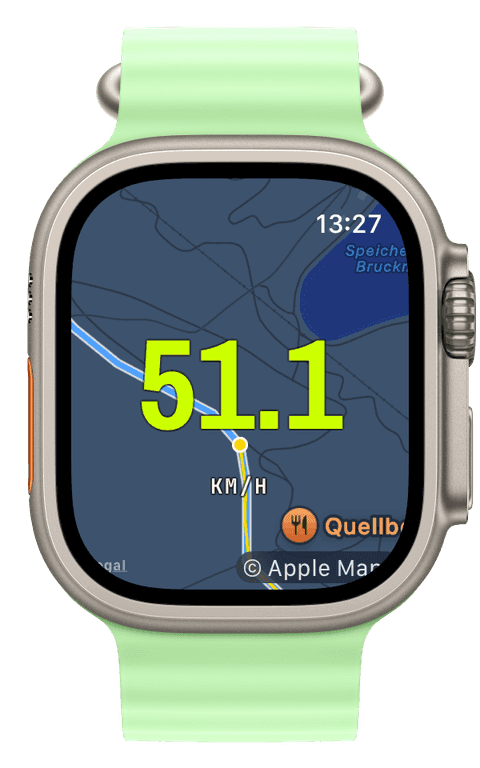
A board day, recorded end to end
Start the workout at the first lift and the watch records the whole day: the GPS track across the resort, current speed, altitude with descent metres accumulating separately from the lifts’ ascent, and heart rate straight through, park laps included. The screen is composed on the iPhone, a huge speed numeral, descent beside it, whatever your day is about.
Runs are yours to mark: tap New Segment when you drop in and each run becomes its own split with distance and average speed, no guessed lift detection, no fictional run counts. The evening’s height diagram tells the story anyway, every lift up, every line down.
Maps and the save, without strings
Sync the resort as offline tiles the night before and the map works all day regardless of the valley’s coverage, position, trail, Crown zoom. When you unstrap, the day saves to Apple Health as a Snowboarding workout, its own type, not a ski entry, with the full route attached. No account, no subscription, no premium unlock between you and any of it.
- Speed
- Current speed in a numeral you can read mid-run, with per-run averages when you mark runs as segments.
- Descent & altitude
- Descent metres growing run by run, separate from lift ascent, with the day’s height diagram afterwards.
- Offline map
- The resort rendered from tiles on the watch itself, with your trail on it, coverage or not.
- Heart rate
- Continuous across runs and lifts, and honest about how much work a powder day actually is.
- Runs as segments
- One tap at the drop-in, and the splits page lists your day as runs, each with its own distance and speed.
- GPS route
- The full day across the mountain, saved with the workout into Apple Health.
Our pick of watch screens for this sport — designed in the Runara screen designer, ready to run on your wrist.
Type the code into the Runara app to import the set, or customize a copy in the designer and share your own.
Offline Maps
Save a map area on iPhone and your Apple Watch shows it anywhere, with no signal and no phone.
→3D Flyover
A chase camera flies your recorded route over 3D terrain and exports a share-ready video, right on the iPhone.
→Live Workout Display
Your configured screens render on Apple Watch with real-time metrics, GPS, and haptics, legible at a glance under load.
→Live Weather
Seven environment widgets put live weather and altitude into any workout-screen slot, fetched by the watch itself.
→Workout History & Splits
Browse every saved workout with route maps, per-segment splits, and full metric detail.
→Achievements
A trophy room of eighty achievements across sixteen workout types, with engraved cups and a celebrating parrot.
→Can the Apple Watch track snowboarding properly?
Yes, and in Runara it is a first-class sport: its own workout type with speed, descent metres, altitude, heart rate, and the GPS track, saved to Apple Health as a Snowboarding workout, not filed under skiing.
How do I get stats per run?
Tap New Segment when you drop in. Each run becomes its own split, distance, time, average speed, and the lift rides sit between them. Runara does not auto-guess runs; one deliberate tap keeps the numbers honest.
Do board days count toward rings and achievements?
Yes. The day closes exercise minutes in Apple Health, feeds your training load through its heart-rate effort, and collects the snow-day achievements alongside skiing.
Do the maps work in resorts with bad coverage?
Yes, that is what the offline tiles are for: sync the resort’s region at home and the watch renders the map itself all day, no signal required, no region purchase, no subscription.
Track Snowboarding your way
Runara turns your Apple Watch into a custom Snowboarding computer. Native and private, free for your first three workouts, then one purchase unlocks everything, no account, no subscription.