
The watch that stops when you do
Runara 1.7 brings the most requested feature, auto pause, and a readiness verdict that listens to your HRV and resting heart rate, just as Apple Watch Series 12 and Ultra 4 start measuring HRV far more often.
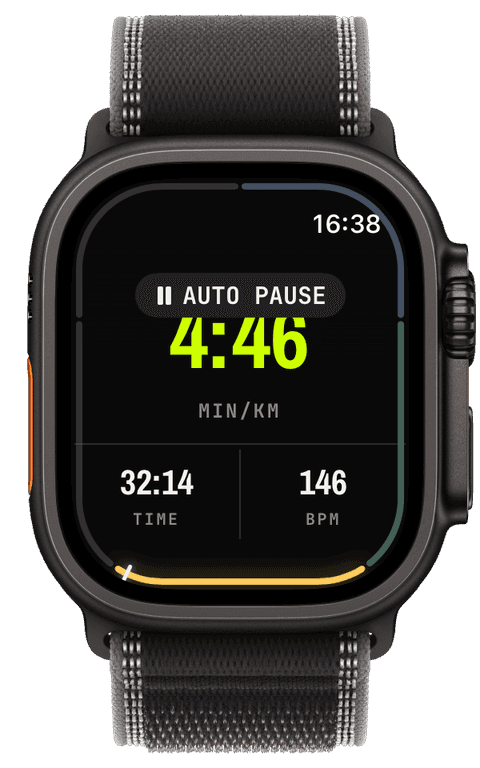
Two weeks ago I wrote about a map that grew a third dimension. Since then Runara went from 1.6 to 1.7, and none of it is cinematic. This stretch was about the requests that kept arriving in my inbox, one in particular, and about a question the training-load chart could never answer on its own: not how much you trained, but how well your body took it. Apple, as it happens, picked the same two weeks to announce the watches that answer that question better than any before.
The most requested feature
No question has reached me more often than "does it auto pause?" Every crossing, every gate, every water fountain counted as workout time and dragged the average pace down, and Apple's own Workout app has paused itself for years. The honest answer used to be "not yet". Now it is yes.
Runs, trail runs, walks, hikes, rides and mountain-bike rides pause themselves when you stop and resume the moment you move again. The watch confirms both with a haptic and a small capsule, "AUTO PAUSE" in grey, "RESUMED" in volt, and nothing speaks, because a voice at every traffic light would be unbearable within a week. It is on by default; the iPhone settings switch it per sport, and the watch's actions panel turns it off for a single session.
The signal is GPS ground speed, and the whole design is about not trusting it too much. Each sport has its own profile, because a runner, a hiker and a road cyclist "stop" at very different speeds: a run pauses below half a metre per second after three seconds, a hike below 0.35 after four, a ride below one. A fix with unknown speed or poor accuracy is ignored completely. Unknown is not the same as stopped, so a tunnel or a dense canopy never pauses you. And a pause you make by hand belongs to you: Runara never resumes it, and after a manual resume it waits until you are really moving before it watches again.
The first builds were humbling. A cold GPS reports drifting, near-zero speeds for its first ten-odd seconds, so one of the first user reports was a run that paused itself at the start line while its owner was already running. The fix is in the changelog as plainly as I could put it:
fix(auto-pause): start unarmed — a slow start no longer pauses
The detector now waits for one full streak of real movement before it arms. The second lesson followed quickly: the running thresholds turned out to be tuned for someone who never walks, and a walking break on a hill counted as a stop. The thresholds came down, and walking breaks are workout time again. German users got their own fix: the paused marker, "PAUSIERT", was cut off in small widget slots, so it now reads "PAUSE".
An auto pause is an ordinary pause: the watch uses the same pause as the button, so Apple Health and Apple Fitness see normal pause events. And since 1.7 every workout-detail chart shades the stretches you spent standing, so you can see exactly where the crossings were.
Your body gets a vote
The training load chart has always been maths on effort. It turns your workouts into fitness, fatigue and form, and form decides the verdict: GO HARD, TRAIN, EASY or REST. What it could never know is how you slept, or whether the hard week actually landed. A runner with a suppressed HRV and a resting pulse five beats above normal still read "TRAIN", because the numbers said so.
With 1.7, readiness listens to your heart. The iPhone reads the heart rate variability and resting heart rate your watch has already saved to Apple Health, takes each day's median, compares the last seven days with your own previous sixty, and if either signal says you are strained, the verdict steps down one zone. It never steps up: a great HRV is good news, but it can't talk you past an overloaded week. The History tab shows both signals as tiles against their baselines, a detail page charts the last thirty days, and the widgets and the watch complication say why the verdict dropped, "HRV low · RHR high".
The timing is not a coincidence I can take credit for. Apple Watch Series 12 and Ultra 4 bring Apple's new Health Sensing System, and Apple says they measure HRV as often as every five minutes, 24 times more often than before. That matters for exactly this design. A daily median is only as good as the readings under it, and a baseline built from sixty days of dense HRV is a much steadier yardstick than one built from a single reading a night. Readiness works with any Apple Watch that records HRV. On the new ones, it simply has far more to go on.
The privacy posture didn't move. The HRV read happens on the iPhone only, the watch app never asks for it, nothing is uploaded, and if you don't grant the new permission, readiness behaves exactly as it did before. Existing users will find an "Update Health permissions" button on the readiness card, because Apple Health never re-asks on its own when an app starts reading something new.
How did that kilometre go?
The second most requested thing, it turns out, was a split card. At every kilometre (or mile) the watch now takes over the screen for six seconds: split time, how much faster or slower it was than the last one, average heart rate, ascent, and your overall average pace, drawn in whichever of the five screen styles you are looking at. Six seconds, because the first version showed it for three, and three seconds is not enough to raise a wrist and read four numbers mid-stride.
Then the obvious follow-up requests arrived within days. Not every kilometre on a long run, please. One card per lap instead. And not at all on the trail, where a 10 % grade makes every split meaningless. So the card has modes now, every 1, 5 or 10 units, only at your own segments, or off, and each sport can override the default. There is also a new Average Pace widget, the whole-workout number every race result uses, which is now widget number thirty-four.
Hands full
One more change was small but asked for loudly: marking a segment used to take a swipe and a button tap. Now a double tap on the screen starts a new segment, and so does the hardware Double Tap gesture, index finger to thumb, on Series 9, Ultra 2 and later, and so does the Action button on an Ultra. A volt "SEG" flag confirms it. The things double tap used to do, expanding the map and changing a widget's smoothing, moved to a press and hold. If you are running with the new Ultra 4, the Action button is the fastest way to mark a lap that Runara has.
The small honest rest
Hikes, ski days and snowboard days were being saved to Apple Health under the wrong activity type, one hike reportedly as "Game". They aren't anymore. Stopping a workout under thirty seconds now asks whether to save it, because nobody wants a nine-second "run" in their history, and discard really discards. Audio cues come back after you unmute them mid-workout. The cadence chart no longer opens with a spike of several thousand steps per minute. And, from a user report, your position no longer jumps around in the first seconds of a workout while the GPS settles.
Out now
Runara 1.7 is on the App Store as a free update. Nothing about the posture changed: no account, no cloud, no analytics, and the new heart data is read on your iPhone and stays there. If you're getting a Series 12 or Ultra 4, give readiness two weeks of wearing it, that is how long a baseline needs.
See you at the next crossing. The clock will wait.
Auto Pause
Runs, rides, walks and hikes pause themselves when you stop and resume the moment you move again, tuned per sport, on by default.
→Readiness & HRV
Readiness weighs your HRV and resting heart rate from Apple Health against your own baseline, and Apple Watch Series 12 and Ultra 4 feed it far more HRV than any watch before.
→Training Load
CTL, ATL and TSB charts turn your workouts into a readable picture of fitness, fatigue and form.
→Live Workout Display
Your configured screens render on Apple Watch with real-time metrics, GPS, and haptics, legible at a glance under load.
→