
The list behind every app
Runara 2.0 and 2.1 are out, and behind every feature sits a list nobody sees: screen sizes, text sizes, permissions, widgets, Siri, gestures, languages, foldables, old hardware. How I decided each one for Runara, plus a checklist for your own app.
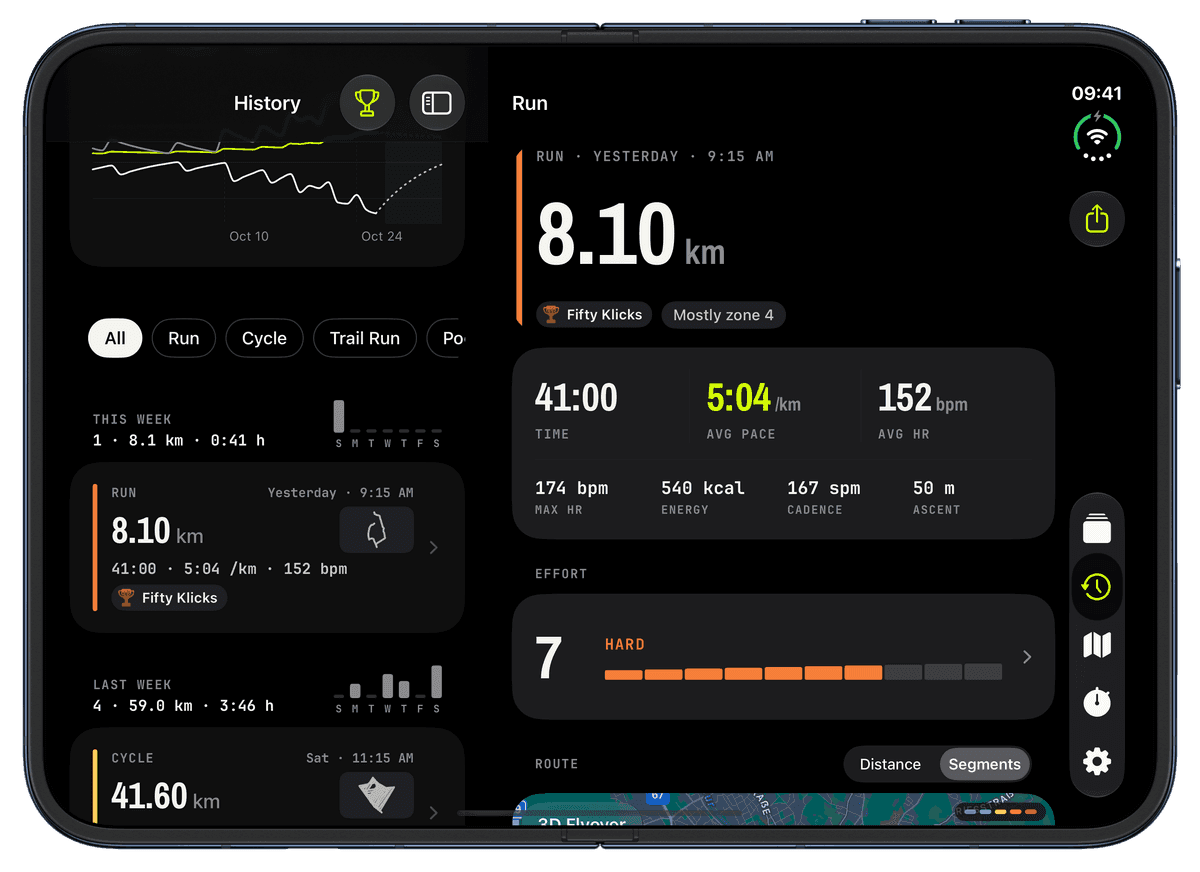
I haven't written here since 1.7, and in the meantime Runara reached 2.0 and 2.1. Version 2.0 lets you design watch screens in the free online designer and bring them onto your wrist with a QR code or a share code, and it brought clearer screens on every watch size, longer battery life and a long list of fixes. Version 2.1 rebuilt the History tab around what each workout actually did for you: readiness first, training load at a glance, weeks with a bar for each day, and a workout page with zone-coloured routes, splits and the session's training effect.
Both releases have their changelogs. This post is about something else, the part of app development nobody puts in a changelog. Every one of those features had to be decided against a long list of other questions first: which screen sizes, which text sizes, which devices, which system surfaces. That list grows every year, and almost none of it is visible when an app works.
So here is that list, from the perspective of a running app built by one person. For each item: what Runara does, and why. At the end there is a checklist you can go through for your own app.
The hidden size of a modern app
When people imagine an app, they imagine the main screen. Mine is a set of numbers on a watch. But an iPhone app in 2026 also lives on the Lock Screen, in the Dynamic Island, on the Home Screen, in Siri, in Shortcuts, behind a hardware button and inside the share sheet. It has to work at a dozen text sizes, in two appearances, in several languages, for people who can't see the screen, and on hardware that ranges from this year's flagship to a five-year-old model with a tired battery.
None of those are optional in the sense that the platform ignores them. Each one is either a decision you make or a decision that gets made for you, usually badly. The only real mistake is not deciding.
The screen itself
Screen sizes. This one was never a choice for Runara. Apple Watch ships in a range of sizes from 40 mm to the 49 mm Ultra, and a 42 mm screen has noticeably less room than a 46 mm one. A layout that looks perfect on the big watch truncates on the small one. So the watch screens are fitted rather than drawn: when a cell runs out of room, the padding gives way first, then rows trade height with each other, and only the numeral shrinks. Labels keep their size. The rule I hold myself to is that a value may shrink but must never be cut off, and I check every screen against the smallest watch and against stress values like a 10:23:45 clock. The iPhone even asks the paired watch for its real screen size, so the screen editor shows you the watch you actually wear.
Rotation. The iPhone app is portrait only. Everything in it, the screen editor, the History tab, the workout page, is designed as one tall column, and a landscape version would be a second app's worth of layout work for a phone that mostly sits in a pocket or on an armband. This is the kind of no that has to be written down, because once you declare iPad support, Apple requires every orientation. And one device doesn't ask: on the inner display of the iPhone Duo, the system ignores the portrait lock and shows the app wide or in landscape anyway. The only way to force it back is to letterbox the whole app, so Runara adapts there instead (more on the Duo below).
Text size. On the iPhone, text follows your Dynamic Type setting. On the watch, the big live numerals deliberately don't. They are an instrument, and their size is already the largest that fits the cell; a larger text setting has nowhere to go except into truncation. That is a trade-off I made consciously, not one I forgot.
Light and dark mode. Runara is dark. Not "dark by default", dark. The whole visual language, volt on near-black, hairline borders, numbers that glow, comes from the watch, where black pixels cost no battery and disappear into the bezel. A light iPhone app would have been a second design system to maintain for a look that doesn't fit the product. The one exception is on the watch: one of the five screen styles, Field Utility, is a light face for bright sun. (This website, by the way, does follow your system setting. Different medium, different answer.)
Which devices, really
iPhone, iPad, Mac, Vision Pro. Apple's platforms make it tempting to tick every box. Runara runs on iPhone and Apple Watch, and nowhere else. An iPad version would need its own layouts, every orientation and multitasking, and it would be an app for configuring a watch on a device you don't take running. A Mac or visionOS app would be even further from the point. The minimum versions are iOS 26 and watchOS 26, because the Liquid Glass design was the foundation from day one, and that was worth more to me than the few percent of people on older systems. I wrote that down as well, including the sentence "We accept this."
Multiple windows. Follows directly from the above: an iPhone-only app has one window. On the iPad this would be a real question, and a hard one. The closest Runara gets is the open Duo, where one window shows two panes side by side, which is a much smaller problem than two windows sharing state.
iPhone Duo. The foldable is the one device that broke the "one tall column" assumption. Closed, its outer display is wider and shorter than any other iPhone, and the system turns the tab bar into a vertical side bar; Runara works there like on any iPhone, with buttons that carry an icon so the side bar can show them. Open, History, Plans and Settings become list and detail side by side, the screen editor puts the watch preview next to its settings, and the watch screens fill four columns. Partly folded, the panes and the gaps between columns line up with the fold, and map buttons stay clear of the hinge and the cameras. The hard rule behind all of it: every new layout only switches on at a width no other iPhone ever reaches, so every other iPhone runs exactly the code it ran before, and screenshots of the regular iPhones are compared pixel by pixel to prove it.
Device generations. This is the one that bites hardest on the watch. Every model runs the same app, but not at the same speed, and the battery of an older watch has less to give. Version 2.0 contained a whole round of work only for this: a manual pause now idles the GPS and the sensors, sensors only run when a widget on your screens needs them, the live screen re-renders only what changed instead of the whole view, and with your wrist down the watch updates every five seconds instead of every second. Some features depend on hardware outright: the Double Tap gesture needs a Series 9 or Ultra 2 or later, and the barometric altimeter falls back to GPS altitude on watches that don't have one.
The system around the app
Live Activities. While you work out on the watch, the iPhone shows time, distance, pace and heart rate on the Lock Screen and in the Dynamic Island. The interesting decision here was the update rate. The first version updated every three seconds, which means about 1,200 Bluetooth wake-ups of the phone per hour. Since 2.0 it updates every ten seconds, plus immediately on pause and resume, and the clock runs on the phone by itself, so it still looks perfectly live.
Widgets. Runara has Home Screen and Lock Screen widgets for training load and form: small, medium and large ones, plus circular and inline ones for the Lock Screen. Every size needs its own layout, and "it fits" has to be checked for each of them in every language. What widgets don't do is show a running workout; that is the Live Activity's job.
Complications. On the watch face, Runara offers a start button and three training-load complications in the circular, corner, inline and rectangular families. Complications are tiny, and the smallest ones took several tries to stop looking broken. I wrote about that a while ago.
App Intents, Siri and Shortcuts. Runara has exactly one intent with two phrases: "Start a workout in Runara" and "New segment in Runara", in English, German and French. I could expose dozens of intents. I chose the two things you actually want to do with your hands busy, and nothing else, because every intent is a promise that has to keep working with every iOS update.
Action Button. On an Ultra, the Action button uses that same intent: pressed at rest it opens the workout picker, pressed during a workout it marks a new segment or pauses, whichever you set. The setting only appears on the iPhone if your watch is actually an Ultra, because a setting for a button you don't have is just noise.
Gestures. A double tap on the screen and the hardware Double Tap, index finger to thumb, do the same thing, by default a new segment. Two gestures, one setting, because to the person wearing the watch they are one gesture. A long press expands the map, the Digital Crown zooms the map and rates your effort, and setting the double tap to "Nothing" hands the gesture back to the system.
Sharing. Every workout can be shared as a GPX file or as a poster image, a 3D flyover can be exported as a video, and GPX files from anywhere can be opened in Runara (since 2.1, with a review step before anything is saved). Sharing is also how 2.0's big feature works: screens travel from the website to your phone as a QR code or a share code, without an account and without a server that knows who you are.
Permissions. Runara asks for Apple Health (to read heart data and save workouts), location (for the route), motion (for cadence), the camera (only to scan a screen code) and the photo library (only to save a flyover video, and only to add to it). The camera and photo questions come up when you use those features, not at the first launch. The interesting part is what happens after a no. A denied Health access doesn't leave you with an empty History that looks broken; it says that access is off and takes you to the right place in Settings. A denied location turns the map's locate button off and says why. A denied camera still leaves you the share code to type in. And HealthKit has a twist of its own: it never tells an app whether read access was denied, so "no data" and "not allowed" look the same, and the app has to word its empty states for both.
The even harder case is a new feature that needs a permission you never had. HealthKit asks for each data type once, and never again. When readiness started reading heart rate variability, every existing user had already answered the old question. Runara remembers which version of its permission set you last answered, so it can show "Update Health permissions" in Settings and an "Allow access" button right on the card that needs it, instead of silently showing nothing. The next one is already on the way: rating how hard a workout felt, coming in 2.2, saves Apple's effort score to Apple Health with the workout. That is a new data type to write, so for everyone who installed Runara before, the permission question appears the moment they tap Save on their first rating, when it's obvious why it's being asked.
Everyone, everywhere
Accessibility. VoiceOver reads each metric as one element, so you hear "5 kilometres per hour" instead of a "5" followed by a unit. The heart-rate zones offer a colour-blind palette, because a red-to-green ramp fails for roughly one in twelve men. The honest gap: the live numbers don't announce themselves while they change. That is on my list, and I would rather say it here than pretend the app is perfect.
Translation. Runara ships in English, German and French, every screen, every string, and the spoken cues too. Translation is much more than strings: German labels are longer and needed shorter versions for the smallest watch cells, decimal marks follow the language of the voice, and distances, climbs and plan steps follow your choice of kilometres or miles everywhere. Each language is a permanent commitment, because every new feature then has to ship in all of them.
Animations. The rule is simple: moments may celebrate, live data may not. A new trophy can pop, a completed workout can cross-fade into its summary, but the pace numeral never rolls or bounces, because an instrument that animates is an instrument you can't read. Every animation in the app goes through one gate that turns it instant when Reduce Motion is on, and with your wrist down.
iCloud backup. Your screens, settings and routes are backed up to your own private iCloud, which is not the same as syncing them. The backup is written once per app start, never while you're editing, so "Restore from iCloud" also works as an undo. Map packs aren't uploaded at all; they are tens of megabytes each and can simply be regenerated. Runara itself still has no server, no account and no cloud of its own.
Runara at a glance
| Aspect | Runara's decision |
|---|---|
| Screen sizes | All watch sizes, layouts fitted per cell |
| Rotation | Portrait on iPhone, adaptive on the open iPhone Duo |
| Text size | Dynamic Type on iPhone, fixed instrument numerals on the watch |
| iPad / Mac / visionOS | No, iPhone and Apple Watch only |
| Multiple windows | No, but two panes on the open iPhone Duo |
| iPhone Duo | Yes, closed, open and partly folded |
| Accessibility | VoiceOver, colour-blind zones, Reduce Motion |
| Live Activities | Yes, Lock Screen and Dynamic Island |
| Widgets | Yes, training load in five sizes |
| Complications | Yes, start plus three training-load complications |
| Siri and Shortcuts | One intent, two phrases |
| Sharing | GPX, poster, flyover video, screen share codes |
| Permissions | Asked in context, explained when denied, re-asked when new |
| Gestures | Double tap, Double Tap, long press, Digital Crown |
| Action Button | Yes, on Ultra |
| Languages | English, German, French |
| Animations | Gated, never on live data |
| Older devices | Battery and performance work in 2.0 |
| iCloud | Backup, not sync |
| Light and dark | Dark only |
The checklist
If you build an app for Apple's platforms, go through this list before you write the first screen, and again before every major release. The goal isn't to say yes to everything. The goal is that every answer, yes or no, is one you chose. Mark each item Support or Skip, add a reason if you like, and download the whole list as a Markdown file with your decisions in it. Your answers stay in your browser.
Screen sizes: Have I tested the smallest and the largest device, with the longest realistic values?
Rotation: Does landscape make my app better, or just harder to build?
Text size: What happens at the largest Dynamic Type setting, and where do I cap it, and why?
Platforms: Do iPad, Mac or Vision Pro serve my users, or only my App Store page?
Multiple windows: If I support iPad, can two windows of my app exist at once without corrupting state?
Accessibility: Can someone use my core feature with VoiceOver alone? Do I rely on colour to carry meaning?
Live Activities: Is there something live worth showing, and how often does it really need to update?
Widgets: Which sizes and families, and does each one show something useful at a glance?
Complications: Which watch face families, and is there a one-tap path into the app?
App Intents: Which two or three actions would people trigger by voice or Shortcut?
Sharing: What can leave my app, in which format, and what can come in?
Permissions: Does every feature still make sense after a no, and how do I ask again when a new feature needs more?
New device classes: Is a new kind of device or configuration coming that my app should be ready for?
Gestures: Which hardware gestures does my audience have, and do my custom gestures collide with the system's?
Action Button: Is there one action worth a physical button?
Translation: Which languages, and am I willing to ship every future feature in all of them?
Animations: Does every animation respect Reduce Motion? Does anything animate that people need to read?
Device generations: How does my app feel on the oldest supported device, and what does it cost the battery?
iCloud: Backup or sync, what exactly is stored, and how does a restore look?
Light and dark: Both, one, or follow the system, and have I checked every screen in each?
0 of 20 decided
Your answers stay in this browser.
Write the answers down, including the no's and the reason for each. A year later, when someone asks why the app doesn't rotate, you'll have the answer, and you won't be tempted to reopen a decision you already thought through.
And this is only half the map
Everything above is iOS and watchOS. Add Android and the list doesn't grow by a few items, it roughly doubles: a second language, a second UI framework, thousands of screen sizes instead of a handful, watches from many manufacturers with different health platforms, foldables that change their shape while your app runs. Add tablets, desktops, TVs or cars, and each brings its own list. That is why Runara is an Apple-only app, and why this post doesn't pretend to cover more. A solo developer can do one ecosystem properly, or several badly, and I know which one I want to use on my own runs.
Out now
Runara 2.1 is on the App Store as a free update. Free to try, one purchase unlocks everything forever, no subscription. No account, no tracking, no ads.
If you're a developer and this list made you a little tired, that's fair. It made me tired too, more than once. But every item on it is a chance to make an app feel like it belongs on the device, and that feeling is most of what separates a good app from one that merely works.
Custom Workout Screens
Design your own Apple Watch workout screens: seven layouts, thirty-four data fields and widgets, five visual styles.
→Workout Live Activity
While a workout runs on the watch, the iPhone shows live time, distance, pace and heart rate.
→Training Load
CTL, ATL and TSB charts turn your workouts into a readable picture of fitness, fatigue and form.
→Workout History & Splits
Browse every saved workout with route maps, per-segment splits, and full metric detail.
→