
A clean round-trip to Apple Health
Saving every workout back to Apple Health with its route and splits, and the data-loss bug I caught one save before it would have wiped real settings.
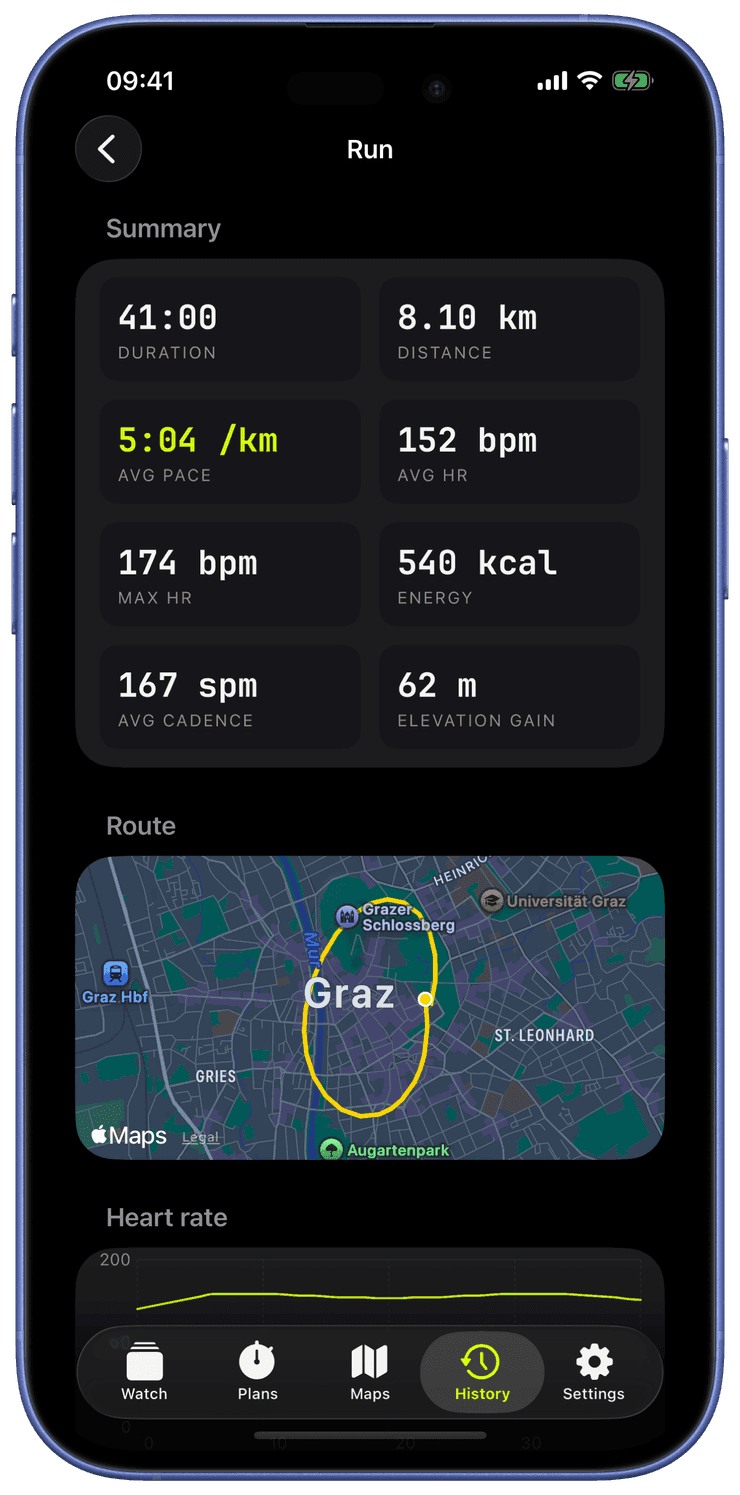
A workout you cannot look back on later is just a stopwatch. This post is about the round-trip: writing every session into Apple Health properly, building a place to browse them, and the bug that nearly turned that whole pipeline into a data shredder.
Writing it back, completely
When you tap stop, Runara writes a complete workout into Apple Health: the route as a real route object, heart-rate samples, distance, active energy, and per-segment events so your splits survive too. The route builder is created the moment the workout starts and fed GPS as you go, so by the time you finish there is nothing to assemble, it is already correct.
This matters more than it sounds, and it ties straight back to why I built this. Your workouts do not live in some Runara database I control. They live in Apple Health, on your phone. Apple Fitness sees them. Any other Health-aware app sees them. And if you delete Runara tomorrow, your training history is still there, because it was never mine to hold hostage. That is the privacy stance made concrete: the app is a good guest in your data, not a landlord.
The History tab is the other half. It lists every saved workout and opens each one into a route map, a splits table, and the metric diagrams. Building it surfaced a small but real annoyance: Apple deprecated the convenient totalDistance and totalEnergyBurned properties on workouts, so I migrated everything to the newer statistics queries. Tedious, but the kind of thing you fix once and forget.
Battery, and reading numbers out loud
Two pieces of polish landed around here that I care about disproportionately.
The first is battery. GPS is the hungry part of any running app, so accuracy is a setting, not a fixed cost. Best gives you a tight five-metre track and eats battery on a long run. Balanced and Battery Saver loosen the accuracy and the update distance for the days when you would rather finish with a charge to spare. You choose what the run is worth.
The second is accessibility. The metric numerals get proper VoiceOver labels, so the watch says "five point two kilometres per hour," not "five, pause, point, pause, two." And the heart-rate zones gained an optional colour-blind-safe palette whose brightness climbs steadily from zone to zone, so it reads correctly even if the usual red-to-green ramp does not work for your eyes. I am not colour-blind, but a good instrument should be legible to everyone holding it.
The bug that scared me
Now the one that genuinely rattled me.
Remember the rule from the first post, the one that looked like paranoia: every stored type must tolerate being read back when the app has since grown new fields. Here is what happens when you forget it, which I did, in exactly one place.
Swift's automatic decoding throws an error if a stored value is missing a field, even a field that has a default. Every feature I had added since the first version, GPS accuracy, the colour-blind palette, interval plans, audio cues, quietly broke the decoding of any settings blob saved before that feature existed. And the failure mode was the worst kind:
Swift's synthesized Codable.init(from:) throws keyNotFound when a stored property is missing, even when the property has a default. [...] decode() catches the error, returns fresh defaults, UI shows empty, next save overwrites the still-intact on-disk blob with empties, user's data gone.
Read that chain again, because it is a horror story in five steps. The decode fails. The app shrugs and loads empty defaults. You see an empty app and think "huh." You change one setting. That save writes the empty state over your real, still-perfectly-good data on disk. Now it is actually gone. The app erased your settings, and it did it politely, one step at a time, while looking like it was working.
The fix:
fix(persistence): UserSettings Codable now tolerates missing keys, ends redeploy data-loss
Hand-written decoding that reads every newer field as optional with a sensible default. Old data loads cleanly. Three regression tests now lock that contract in place so it can never silently rot again, and the catch block that started the whole cascade now logs loudly instead of swallowing the error. I also promoted "every persisted type follows this rule" from a note to a hard project rule.
A related, gentler version of the same theme showed up in onboarding:
fix(onboarding): restore first-run starter screens that landed empty
Fresh installs were greeting people with a blank slate instead of the three starter screens they were supposed to get. Same family of problem, much lower stakes, but a reminder that "the first run" and "the thousandth run after an update" are both edge cases that deserve a test.
The honest bit
I want to be clear about the human-and-machine split here, because this is exactly where it matters. Claude wrote a lot of correct, clean code very fast. It did not, on its own, foresee that a caught-and-defaulted decode error would cascade into silent data loss across an app update. That is a systems-level, "what happens on the unhappy path three releases from now" worry, and catching it was on me, my experience, my paranoia, my insistence on writing the regression test that proves it stays fixed. That is the part you cannot outsource, and it is the whole reason I am comfortable putting my name on this.
Next: teaching the watch to coach, with structured intervals and a voice that actually speaks German.